
Phillip Benjamin (Radial) asked a question.
AS2 connection that is using 2 different certificates in the AS2 connection signing and encryption & HTTPS (the secure connection only) Can AS2 connections be setup to use 2 supplier certificates?
Send' encountered error #3800
AS2 Post error: System error: server certificate verification failed. Connection aborted.
Can MoveIT automation AS2 connections be setup to use 2 supplier's certificates?
Do you mean having a different signing certificate to decryption certificate? Yes - but on the decryption certificate, you have to uncheck the 'Use signing certificate for decryption' option
the client (us) has the ability to have 2 certificates. The supplier only 1 certificate.
Where would the other certificate be added?
Sorry, struggling to understand why you would want 2 certificates for the partner, unless you need both send and receive for the same client and they use different certs for encrypt vs sign?
If you are SENDING files
Signing Certificate - your cert, used to sign the files. Partner needs the public cert to validate authenticity
Partner Certificate - partners cert, use this to encrypt the file
If you are RECEIVING files
Decryption Certificate - your cert, used to decrypt incoming files. Can be the same as the signing cert, otherwise use signing cert too
Partner Certificate - partners cert, use to verify the certificate
The supplier's system uses 2 certificates one to connect (http SSL) and one for signature.
separate and unique.
Other systems that we have can accommodate this - however this system doesn't have a setting to add or set for 2 certificates in this manner.
Strictly speaking, that's unrelated to AS2, it's just HTTPS authentication
If you're talking about sending, that certificate goes in the Transport settings and is your own client cert (as you mentioned in the screenshot)
Sounds like you're talking about receiving, that certificate goes in MOVEit Transfer in the user profile (they connect to Transfer, not your Automation)
Yes it is a https certificate -- however the supplier has it setup to use theirs not ours.
In another system we have you can see that I can provide 2 different certificates along with ours.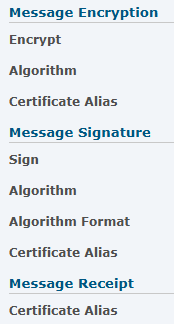
LOL, I work a lot in that 'other system' 😁 (which we won't name here!)
From your last screenshot Message Encryption is their certificate, but the signature is yours. I think you meant to also include the 'certificate authentication' part.
I assume that we're talking about you sending to them as you include 'Message encryption' not decryption in your screenshot. Please say if I've misunderstood
That's fine to use their certificate to connect to them, but they have to have sent you the private key (and password) whilst they keep the public. Some organisations do this if they have certificate trust issues with externally provided certificates. You'd just put that in the Transport Settings client certificate.
So glad you understand. Yes for sending the signature is ours and the encryption is theirs as well as the receipt - 2 different certificates.
They didn't send a private key and we're not using a password.
I will try that in the transport settings once they are ready to test again.
it may be a day or 2 as they are inconsistent with communication.