Option #1: The Version FileThe DLC/version file is a simple ASCII text file which contains the version in the following format, which can also be opened in a text editor.
The Version file location in Progress/OpenEdge installation folder ($DLC on UNIX, %DLC% on Windows).
The Version file contains the current version followed by the Patch / Service Pack number (if applicable) and hot-fix number (if applicable).
Examples:OpenEdge 11.7 First Commercial Shipment (FCS) installation without Service Pack:
OpenEdge Release 11.7.3 as of Fri Apr 27 17:40:05 EDT 2018
OpenEdge 11.7 with Service Pack 3:
OpenEdge Release 11.7.3 as of Fri Apr 27 17:40:05 EDT 2018
An OpenEdge 11.7.3 with Hotfix 010
OpenEdge Release 11.7.3.010 as of Mon Aug 27 08:49:50 EDT 2018
Further information on how the exact version numbers are determined, refer to Article:
Option #2: PROENVStart a PROENV prompt, which will display the contents of the"version" file.
Example:
DLC: C:\prgs\117

Inserting C:\prgs\117\bin to beginning of path and
the current directory is
D:\prgs\wrk\117

OpenEdge Release 11.7.3.010  as of Mon Aug 27 08:49:50 EDT 2018
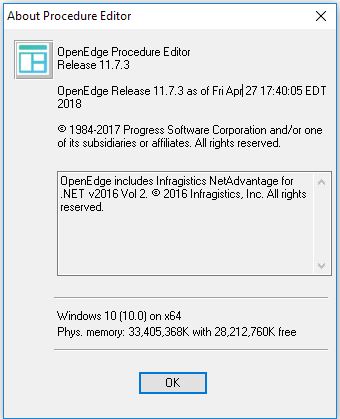
Option #3: Procedure EditorStart Procedure Editor and select
Help > About Procedure Editor. This too will display the contents of the"version" file
 Option #4: Windows Registry
On Windows, the version and a wealth of installed information can be extracted from the Registry. For further information refer to Article:


