Salesforce

PDSOE - Plugin not installed properly after installing 11.7.3

« Go Back

Information

 
TitlePDSOE - Plugin not installed properly after installing 11.7.3
URL Namepdsoe-plugin-not-installed-properly-after-installing-11-7-3
Article Number000124103
EnvironmentProduct: OpenEdge
Version: 11.7.3
OS: Windows
Other: PDSOE
Question/Problem Description
The following error is shown when installing the OpenEdge 11.7.3 Service Pack:

ProvisionEclipseDirs: Command "LaunchAppAndWait("C:\Program Files (x86)\dlc\oeide\integrateArchitect.bat" -update)" failed.
The GetLastError was 13.
Click OK to continue.

After this install error occurs, the installation process completes and finally ends with a success message

DLC\install\oeide\ProgressInstaller\config\*.log
!ENTRY org.eclipse.equinox.p2.director.app 4 0 <date> <time>
!MESSAGE The installable unit com.openedge.pdt.feature.group has not been found. 

!ENTRY org.eclipse.equinox.p2.director.app 4 0 <date> <time>
!MESSAGE The installable unit com.savvion.studio.feature.feature.group has not been found.

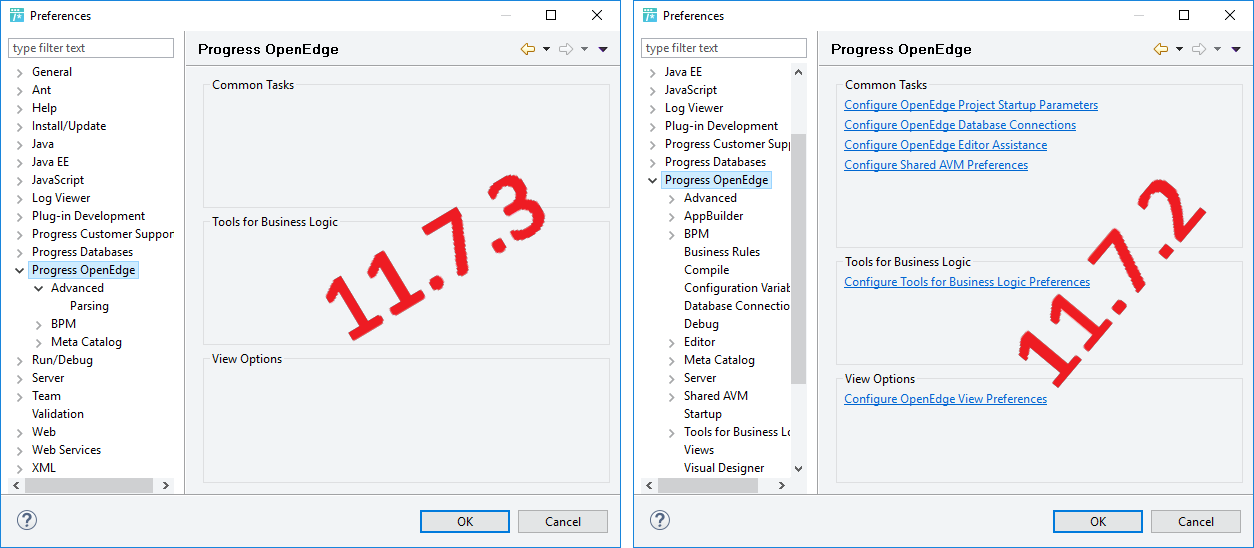
After this install failure the Developer Studio plugin is non-functional:
  • Views fail to load, 
  • Issues with the OpenEdge perspective loading, 
  • Lack of context-awareness for ABL code. 
  • There is no option to start a new OpenEdge Project 
User-added image
User-added image
Steps to Reproduce
Clarifying Information
Error MessageProvisionEclipseDirs: Command "LaunchAppAndWait("C:\Program Files (x86)\dlc117\oeide\integrateArchitect.bat" -update)" failed.
The GetLastError was 13
Defect NumberDefect PSC00365101 and PSC00365336 / ADAS-4244
Enhancement Number
Cause
The exact cause is not known at this time.
 
Resolution

As of Friday, May 18th 2018 Service Pack 11.7.3 was re-released and re-opened for download.  Download and install OpenEdge Service Pack 11.7.3 or later.
 
Workaround
Manually integrate Developer Studio plugins to the Eclipse framework. The PDS plugin will be enabled on successful completion
  1. Launch PROENV.
  2. %DLC%\oeide\integrateArchitect -update
  3. Launch PDSOE with the -clean option (Developer Studio - Clean)
If the above workaround does not succeed, the behaviour can be avoided by -

- a complete re-install of base 11.7
- followed by sequential installation of the service packs: 11.7.1 > 11.7.2 > 11.7.3

 
Notes
Keyword Phrase
Last Modified Date8/13/2018 8:22 AM

Powered by