Salesforce

Setting Umask during installation

« Go Back

Information

 
TitleSetting Umask during installation
URL NameSetting-Umask-during-installation
Article Number000141512
EnvironmentProduct: OpenEdge
Version: All supported versions
OS: UNIX
Question/Problem Description
When installing OpenEdge, what should the umask setting be?
Can all world ('other') write permissions be removed from the progress installation files.
How to prevent tampering with the OpenEdge install media?
When OpenEdge is installed as root the install files are open (777) which could allow unexpected additional install on the machine
Steps to Reproduce
Clarifying Information
Error Message
Defect Number
Enhancement Number
Cause
Resolution
OpenEdge installations should be done as Root.  During the installation, setting a Umask can easily prevent non-root users from being able to modify the installation. Umask takes away permissions depending on bitness and the level used. The following diagram shows the results of entering each number in a Umask command and the effects on permissions.
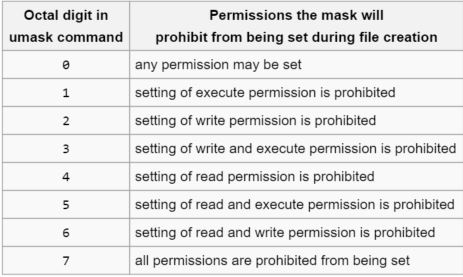
Umask

Examples:
If permissions should only be open for root, to restrict other users then a 022 Umask can be used to take away write permissions for everyone but root.

If there is a group for root that should have write permissions then a 002 Umask would work.
Workaround
Notes
Keyword Phrase
Last Modified Date10/11/2021 8:25 AM

Powered by

