The passessioninfo.p program uses calls to oemanager's REST API to read session and agent information from a pasoe instance.
Prerequisites:
- Install the oemanager service from <install dir>/servers/pasoe/extras/oemanager.war:
proenv>/usr/wrk/oepas3/bin/tcman deploy /usr/dlc/servers/pasoe/extras/oemanager.war
- Add <install-dir>\gui\netlib\OpenEdge.Net.pl to your PROPATH
Pasoe Instance ViewerTo start the tool, extract the attached passessioninfo.zip (Windows only) to a folder, and add that folder to the propath, then run passessioninfo.p.
Below is the connection dialog, for entering instance connection information and the tomcat administrator credentials.
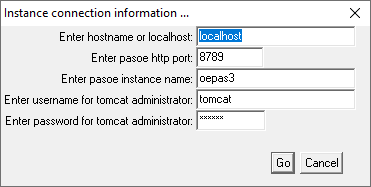
Once the correct connection information is added to the above dialog, press Go and the main application window is shown.
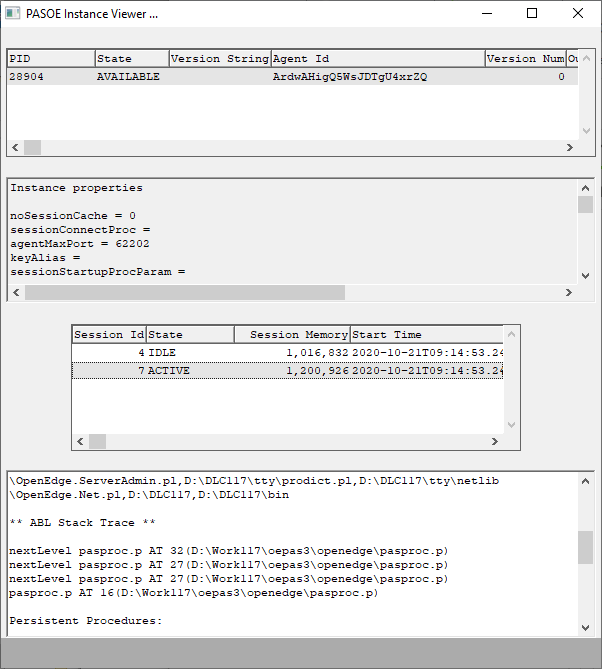 The tool displays a read-only view of:
- All agents running under the instance
- The properties from openedge.properties
- All sessions with session id, start time, state and memory consumption details
- Additional (live) session information like:
- Startup parameters
- Propath
- ABL Stack Trace
- Persistent Procedures
- ABL Class based Objects
- Connected databases
DebuggingIn order to debug the information provided by the tool, you can set LOG-MANAGER:LOGGING-LEVEL to 6 or higher and the tool will write out the json responses from each of the individual rest calls into the working directory of the session.
TestingWithin the attached zip file are the procedure clproc.p and some programs to place into the openedge folder in order to create some activity on the pasoe agent and test this tool.


