On multi-processor systems, Progress uses a spin lock algorithm to control access to shared-memory structures and acquire the resource's latch.
- Spin locks ensure that only one process can use the structure at time, but that all processes can get access to these structures quickly when they have to.
- When a process needs access to a resource, it tests the lock and finds it to be set by another process.
- The process tries to access the resource or “spin” a specific number or times before it temporally “rests”.
- The temporary rest is termed "latch timeout" and the number of retries before resting is controlled by the -spin parameter.
Tuning -spin essentially means increasing its value until the number of latch timeouts no longer decreases. Increasing -spin will also cause an increase in CPU consumption. When CPU consumption gets above 90% it should be decreased.
Spin Lock Retries (-spin)
The database startup parameter syntax is:
-spin <n>
Where:
<n> is the number of times a process tries to acquire a latch before napping.
The -spin parameter, as with all performance utilities, is only available for use with the Enterprise database license. Until OpenEdge 10.1B01, 10.1C where WorkGroup Databases accept a value -spin 1 and only 1 spin lock.
Use Spin Lock Retries (-spin) to set a value to use the spin lock mechanism or a system of semaphores and queues. If the value of n is greater than 0, a spin lock algorithm is used for shared-memory data structures as opposed to semaphores. Once -spin is activated, when a process has to lock a shared-memory structure, the process tries up to n times to acquire the latch for that structure. If it has not acquired the latch in n tries, then the process pauses, or naps. The length of the pause increases gradually if the process repeatedly fails to acquire a latch. After the allotted nap time, the process wakes up and tries to acquire the lock again. If it fails to acquire the lock, it will retry up to the number of tries specified by n.
If the value of n is 0, a system of semaphores and queues is used instead of spin locks. The spin lock algorithm is much more efficient than using only semaphores in a multiple processor environment with the Enterprise database license.
In some cases, if the value of n is 1, it might improve performance even on a single CPU core machine because Progress then turns on the spin lock mechanism. Do not set this parameter to a value larger than 1 if the machine has only one processor core.
On multi-processor/core machines (SMP), start with a value of 50,000 as a ballpark starting point based on research presented: Exchange 2006: DB-7: OpenEdge Database Performance Tuning, page 19 of 42, 'Effect of tuning -spin'. If this causes too much CPU usage, reduce the value and re-evaluate. It is never-the-less a performant tuning parameter where current wisdom on modern CPU systems is to start with -spin 10000 and additionally focus on preventing crossing the NUMA boundary.
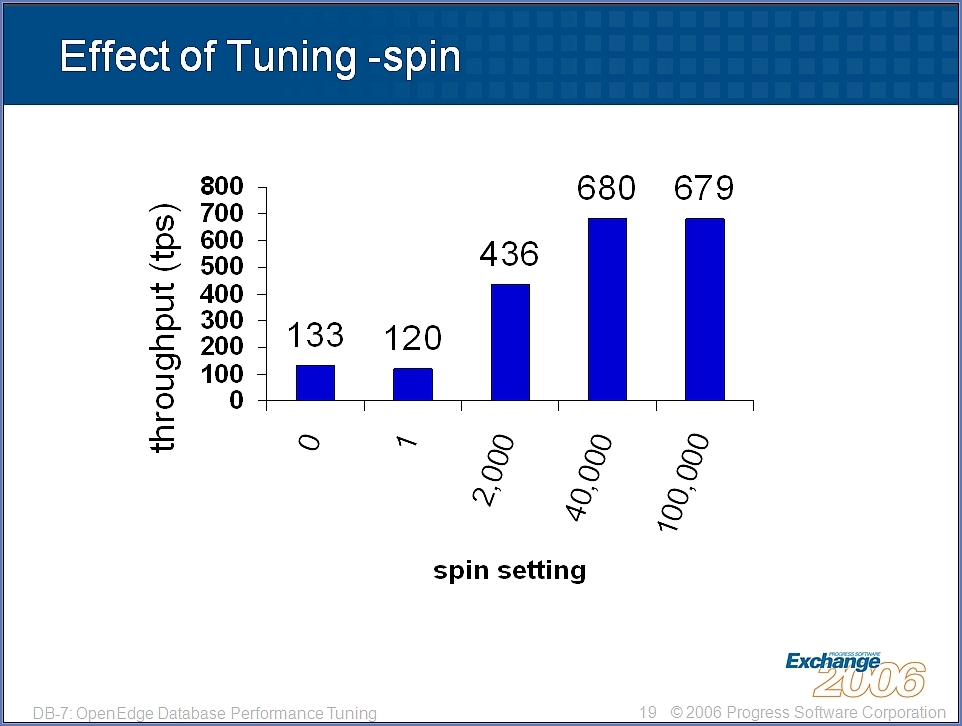
Tuning -spin
The premise of providing -spin is to allow 'retries' when locks are not available, then nap to napmax before trying again. The -spin parameter controls a performance indicator called "Latch timeouts". By setting the -spin value higher, Latch timeouts are reduced. Note that when setting the -spin value higher ceases to reduce Latch timeouts, continuing to set it even higher will affect CPU utilization adversely and yield diminishing returns. The efficiency of -spin can be evaluated through the Progress Monitor (PROMON utility) R&D options.
To monitor Latch Timeouts:
PROMON dbname
> (type) R&D
> 3. Other Displays
> 1. Performance Indicators
> A. by default will provide ten, ten second iterations of sampling.
To view and set -spin online:
a. PROMON:
The current value for -spin, if set at initial database startup, can be viewed and adjusted while the database is running:
PROMON dbname
> (type) R&D
> 4. Administrative Functions
> 4. Adjust Latch Options
> 1. Spins before timeout
In earlier versions, resetting the value of -spin through the PROMON > 1. Spins before timeout (detailed above) was not working correctly. This behavior is fixed in OpenEdge 10.1A onwards. The VST ABL code examples below can be used as a workaround, to reset spin locks on-the-fly, provided spin was initially enabled at database startup.
b. VSTs:
The _Startup Virtual System Table can be used to query the current value for the -spin database startup parameter or modify it.
/* updatespin.p */

FIND FIRST _Startup.
    UPDATE _Startup._Startup-Spin.
Since OpenEdge 11.5, the _DbParams VST should be used instead of the _Startup VST from previous versions. The _Startup VST has been removed from the OpenEdge Database in OpenEdge 12.
DO TRANSACTION:
DEFINE VARIABLE ispin AS INTEGER     NO-UNDO.
FIND FIRST _DbParams WHERE _DbParams._DbParams-Name = "-spin".
IF INTEGER(_DbParams._DbParams-value) >= 50000 THEN
DO:
    ASSIGN _DbParams._DbParams-value = STRING(INTEGER(_DbParams._DbParams-value) / 5).
END.
END.

DEFINE VARIABLE cPmsgs AS CHARACTER NO-UNDO INITIAL
'-spin,-nap,-napmax'.

DEFINE VARIABLE ix AS CHAR NO-UNDO.
DEFINE VARIABLE ii AS INT NO-UNDO.

DO ii = 1 TO NUM-ENTRIES(cPmsgs):

ASSIGN ix = (entry(ii,cPmsgs)).

FOR FIRST _DbParams NO-LOCK WHERE _DbParams._DbParams-Name = ix.

IF AVAILABLE _DbParams THEN
DISPLAY _DbParams._DbParams-Name _DbParams-Is-Modifiable _DbParams-Value SKIP.

END.
END.


