Salesforce

DataDirect OpenEdge How to create 32-bit ODBC DSN in 64-bit Windows machine (embedded video)

« Go Back

Information

 
TitleDataDirect OpenEdge How to create 32-bit ODBC DSN in 64-bit Windows machine (embedded video)
URL NameP118444
Article Number000155194
EnvironmentProduct: OpenEdge, Connect for ODBC, OpenAccess for ODBC
Version: Progress 9.x
OpenEdge 10.x, 11.x
All versions supported for Connect ODBC and OpenAccess
OS: Windows 64-bit
Other: Microsoft ODBC DataSource Administration
Question/Problem Description
Why is OpenEdge ODBC driver not visible on 64-bit Windows in "Control Panel" under "Administrative Tools" in "Data Sources"?
How to create 32-bit ODBC DSN in 64-bit Windows machine
How to configure 32-bit system ODBC DSN in 64-bit Windows machine
How to setup 32-bit system ODBC DSN in 64-bit Windows machine
How to setup Progress / OpenEdge 32-bit SQL92 DataServers on a Windows 64-bit machine
Where is the 32-bit ODBC DataSource Administration tool on 64-bit Windows?
How to create 32-bit ODBC DSN on 64-bit Windows?

 
Steps to Reproduce
Clarifying Information
Error Message
Defect Number
Enhancement Number
Cause
The default ODBC Administration tool on 64-bit Windows will only display ODBC drivers for 64-bit applications, and therefore it will only allow to configure 64-bit ODBC drivers.
Resolution
To configure 32-bit OpenEdge ODBC driver on 64-bit Windows system, please use the Legacy 32-bit ODBC Administration tool 'odbcad32.exe', which can be found at either of the following locations:

%WINDIR%\syswow64\odbcad32.exe 
%SYSTEMROOT%\SysWOW64\odbcad32.exe


Please 
run 'odbcad32.exe' with Local Administrator permissions, which will allow configuring 32-bit ODBC connections in the same way as with the default ODBC Administration tool in "Control Panel" under "Administrative Tools" in "Data Sources".

Here is a short video demonstrating this functionality. Please click 'Full Screen' icon '[ ]' in the bottom right-hand corner to enlarge the video, so that all details are visible, and also increase the sound level on the computer (if the commentator cannot be heard clearly).


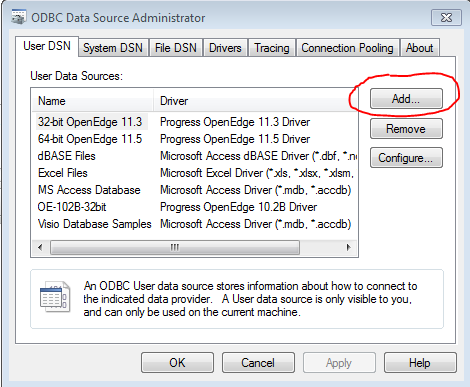
After installing 32-bit Progress application and running 'odbcad32.exeon 64-bit Windows, you will need to add Progress 32-bit ODBC drivers by clicking "Add" button:

User-added image
 
Workaround
Notes
References to Other Documentation:

Microsoft Solutions:
http://support.microsoft.com/kb/942976/en-us
Keyword Phrase
Last Modified Date10/9/2018 10:26 PM

Powered by