Upgrade to
OpenEdge 11.0 or later release.
Starting with OpenEdge 11.0, the command-line ASBMAN utility utiility supports the -agentstop <pid> and -agentkill <pid> Options for this purpose:
- -agentstop (pid) Shutdown agent gracefully
- -agentkill (pid) Kill agent forcefully
The PID of an Agent can be found using the
asbman -query and
wtbman -query command.
- asbman -agentkill all follows the same logic as asbman -kill which sends a SIGKILL signal to terminate the process
- asbman -agentstop all follows the same logic as asbman -stop which sends a SIGTERM signal to terminate the process
Example using default asbroker1 AppServer broker:
$ asbman -query -i asbroker1
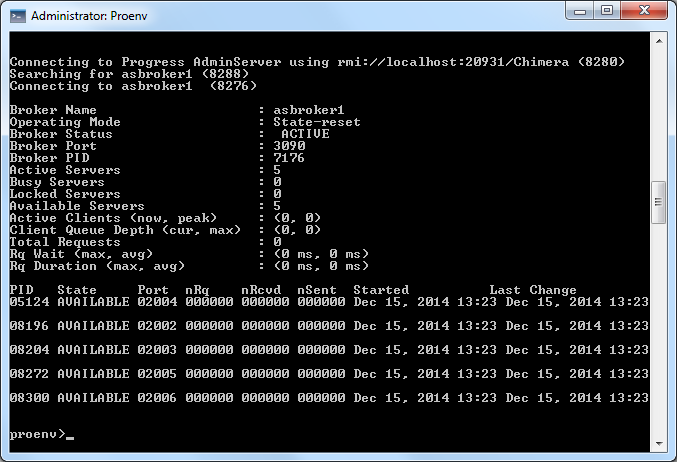
Calling "
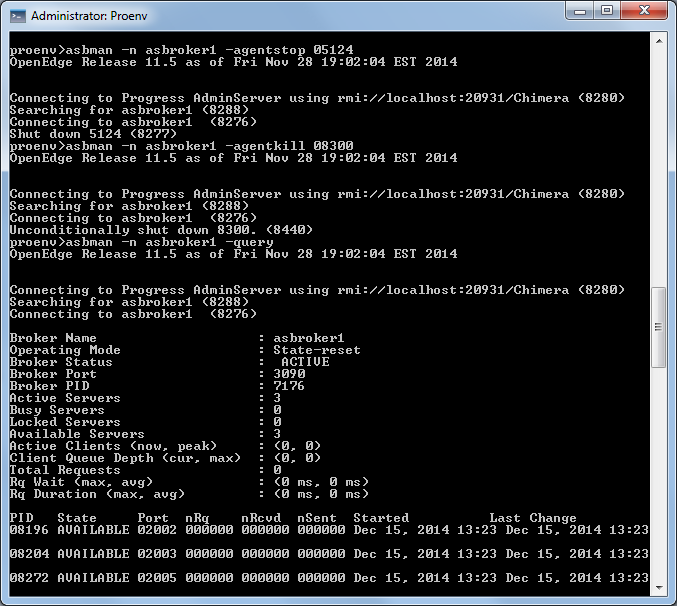
asbman -i asbroker1 -agentstop 05124" and "
asbman -i asbroker1 -agentkill 08300" results in:
Example using default wsbroker1 WebSpeed broker:
1. Use the following command to find the PID of the agent.
wtbman -i wsbroker1 -query
2. Terminate the agent:
wtbman -i wsbroker1 -agentstop <PID>
wtbman -i wsbroker1 -agentkill <PID>


