The information in this article applies to OE 11.x(11.5+); for information on OE 12.x, see the documentation link below:OE 12.x -
https://docs.progress.com/bundle/pas-for-openedge-management/page/Configure-logging-in-PAS-for-OpenEdge.htmlIn OE 12 the property catalina.logging.folder was added to the <CATALINA_BASE>/conf/appserver.properties file. This setting controls the location of all the Tomcat logs, except the agent logfile.
Progress Application Server for OpenEdge (PAS for OE) creates log files at three distinct levels:
- Tomcat (the Web server and JSP servlet container on which PAS for OE is based)
- The multi-session agent that manages ABL sessions running on PAS
- Web applications running on PAS
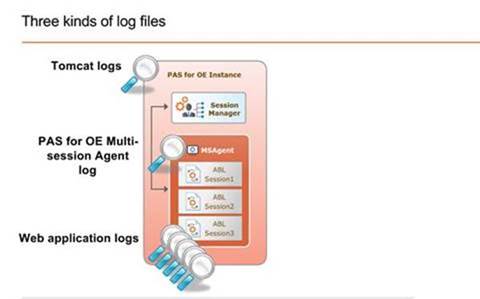 PAS for OE logs and their contents
The following lists contain the logs produced by each component of PAS for OE, and the kind information to be found in each log. The default location for all these logs is $CATALINA_BASE/logs. (CATALINA_BASE is an environment variable containing the root directory of a PAS (Tomcat) instance. On a Unix-based operating system, reference the logs directory as $CATALINA_BASE/logs; on Windows, reference %CATALINA_BASE%\logs).
- Tomcat
- catalina.<date>.log: Tomcat server activity
- localhost.<date>.log: Web application activity
- localhost_access.<date>.log: Requests processed by the Web server
- manager.<date>.log: Activity of the Tomcat manager
- host-manager.<date>.log: Activity of the Tomcat manager for virtual hosts
- Multi-session agent
- <instance name>.agent.log: Activity of ABL sessions. Similar to the server log of a classic AppServer.
- Web applications
- <webapp name>.<date>.log: For each webapp, its interaction with the agent. Similar to the broker log of a classic AppServer.
Configuring logging in PAS for OELogging for each of the PAS for OE components is controlled using its own configuration file:
- Tomcat: $CATALINA_BASE/conf/logging.properties
- The first part of each handler name corresponds to the log that is produced
- What can be configured (Except the access log):
- Logging level
- SEVERE
- WARNING
- INFO
- CONFIG
- FINE
- FINER
- FINEST
- Log file location
- Multi-session agent: $CATALINA_BASE/conf/openedge.properties
- Configure properties under [AppServer.SessMgr]:
- agentLogEntryTypes
- agentLogFile
- agentLoggingLevel
- agentLogThreshold
- See $CATALINA_BASE/conf/openedge.properties.README for an explanation of each property
- Web application: $CATALINA_BASE/webapps/<webapp name>/WEB-INF/logging.xml
- Logging levels are specified in upper-case:
- ERROR (least information)
- WARN
- INFO
- DEBUG
- TRACE (most information)
- At the bottom of logging.xml is an uncommented root node. The default level is WARN, but it can be changed to any other level. The level set in the root node applies to the entire webapp session.
- Other lines above the root node are commented out. To raise the logging level selectively for one or more specific components or areas, uncomment the relevant lines and set the each level to the desired values. Any component where the logging level is not set specifically will be logged at the root level.
Note: "Mapped Diagnostic Content(MDC)" provides additional configurable token fields that can be configured in the SessionManager log file entries. The MDC capability DOES NOT extend to the Agent log file
https://docs.progress.com/bundle/pas-for-openedge-management-122/page/Configure-logging-in-PAS-for-OpenEdge.html 

