1. Export the project or service as either a WAR or ZIP archive file.
File->Export->Progress OpenEdge-> ABL Web Application or
Right-Click the defined service name->Export->Progress OpenEdge-> ABL Web Application
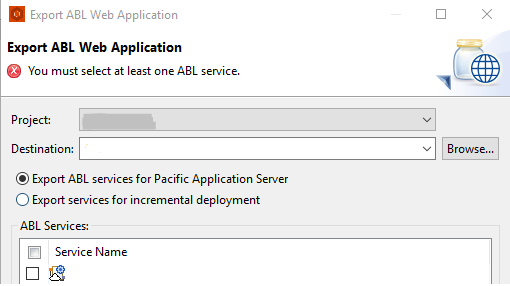
- Chose "Export ABL services for Pacific Application Server" to export the services by creating a single .WAR file for all the selected ABL services in the project.
- Chose "Export services for incremental deployment" to export services by creating a .ZIP file that contains .PAAR file for each selected ABL REST and Data Object service and .handlers files for selected ABL WebSpeed services.
2. Once the file is created, navigate through the file's subdirectories to <filename>\WEB-INF\adapters\rest\ and extract the <servicename>.paar file.
3. In OEM navigate to Resources-> Pacific Application Server-> "PASOE Instance name"-> ABL Applications-> "PASOE Instance name"-> ABL WebApps-> "REST/WebApp name"-> REST transport -> Deploy
4. Select the paar file from the directory where it was extracted to.
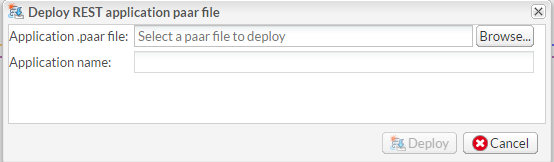
Note: The application name should match the "Service relative URI" configured in PDSOE for the service under REST Resource URI Editor. By doing so the URI in OEM will match the expected service URI. For example:
If the service has a "Service relative URI" equal to "/test_projectService" in PDSOE when importing the paar file in OEM the "application name" should be "test_projectService" so the URI in OEM for the service will be "http://<host>:<port>/<app name>/rest/test_projectService/", otherwise the URI will be broken in OEM.


