Creating the Web Service artifacts
- Generate the ABL procedure files which will be used for the service and compile r-code for them.
- Use the ProxyGen tool to generate .wsm files for the Progress Application Server (PASOE). (Use ProxyGen)
When creating a wsm file for the PASOE in ProxyGen, only the following options are considered:
- AppService name (AppObject)
- SOAP message format (RPC/Encoded, RPC/Literal and Document/Literal)
- Appserver remote procedure(s)
The remaining values can stay default, as they will be ignored.
Deployment
Developer Studio can be used to create/deploy a Web Application (AppServer project). In this WebApp several Web Services (.wsm files) can be deployed via the OpenEdge Explorer tool. All services must have a unique Appservice Name!
- In the Resources screen, select your AppServer (Pasoe) instance
- If it's not running, start it
- Select the Web App Services tab (below)
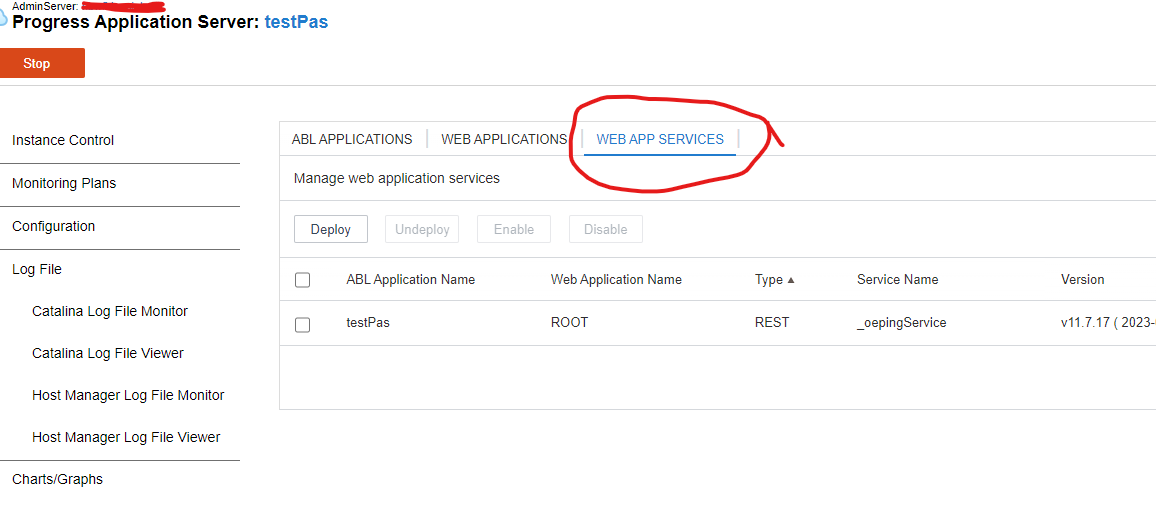
- Select Deploy
- One the Deploy Web Service popup, browse for the generated .wsm file. For Web application name, select ROOT, and select Deploy.
Your Web Service will be deployed and automatically enabled, however you will need to restart pasoe for it to be available for clients.
In the <pas--instance-dir>/bin folder is a batch file / script for deploying a SOAP service named
deploySOAP.[ bat | sh]. This script can be used to deploy a .wsm file into a PASOE instance. See the documentation at
SOAP service deployment (deploySOAP.sh).
For example:
proenv>$CATALINA_BASE/bin/deploySOAP.sh CustomerService.wsm ROOT
Use the following URL to access the wsdl file:
http://[hostname]:[port]/[webapp_name]/soap/wsdl?targetURI=<appservice_name>


