Why is Progress removing the JDK from the OpenEdge Installation Media?
- Due to the changes in vendor’s license terms, Progress has lost its ability to continue distributing JDK as in the past. Specifically, Oracle JDK 8 or later version that was shipped on or after January 1, 2019 cannot be distributed by Progress.
After careful evaluation of available options a decision was reached to certify all future OpenEdge releases for both
- Oracle JDK (to provide continuity for customers who rely on paid Oracle support for production use) and
- OpenJDK (a free version that can be used in production).
- Furthermore, making JDK a pre-requisite will further enhance OpenEdge customers' ability to apply critical/security JDK updates as frequently and as promptly as they consider necessary for their environment.
This approach is consistent with how Operating System installation and critical updates are treated.
Installation:
- Which JDKs are supported for use with OpenEdge 12.1?
| Vendor | Java Runtime | Minimum Version | Short name |
| AdoptOpenJDK | OpenJDK (Hotspot) | 8u222-b10 | OpenJDK 8 |
| Oracle | Java SE Development Kit | 8u221 | Java SE 8 |
| IBM | SDK, Java Technology Edition | 8.0.5.20 | Java SDK 8 |
*Note Java 8 is sometimes referred to as Java 1.8
*Note AdoptOpenJDK version 8 was rebranded but is still available here
https://adoptium.net/temurin/releases/?version=8
JDK versions certified for OpenEdge 12.2, 12.3, 12,4 & 12.5.| OS Platform | AdoptOpenJDK OpenJDK | Oracle Java SE Development Kit | IBM SDK, Java Technology Edition |
|---|
| Microsoft Windows | jdk-11.0.4+11 (x64) (Hotspot) | 11.0.4+10 | - |
| Linux | jdk-11.0.4+11 (x64) for Linux (Hotspot) | 11.0.4+10 | - |
| Oracle Solaris | - | 11.0.4+10 | - |
| IBM AIX | jdk-11.0.6+10_openj9-0.18.1 (OpenJ9) | - | 11.0.12.0 (OpenJ9) |
JDK versions certified for OpenEdge 12.6 and later| OS Platform | Eclipse Temurin(Adoptium) OpenJDK | Oracle Java SE Development Kit |
|---|
| Microsoft Windows | jdk-17.0.3+7 (x64) (Hotspot) | 17.0.4 |
| Linux | jdk-17.0.3+7 (x64) for Linux (Hotspot) | 17.0.4 |
Since OpenEdge 12.2, Oracle Java 11 and OpenJDK for Java 11 are certified since OpenEdge 12.2.
For information about JDKs certified to work with OpenEdge, see the
OpenEdge 12 Platform and Product Availability Guide.
- How do I check which version of Java I am running or having installed on my server?
$>java -version
For example:

Or run the java.exe from the directory JDK was installed:
.\java\jdk1.8.0_221_x64\bin\java -version
- What is the minimum supported version of Java to be used with OpenEdge 12.1?
Minimum Versions:
| Operating System | Version |
|---|
| Windows | 1.8.0_101 |
| Linux | 1.8.0_101 |
| Solaris | 1.8.0_101 |
| AIX | 1.8.0_181 |
The latest information is available in the
OpenEdge 12 Platform & Product Availability Guide 3a.
What is the minimum supported version of Java to be used with OpenEdge 12.2?Minimum Versions:
| Operating System | Version |
|---|
| Windows | 11.0.4 |
| Linux | 11.0.4 |
| Solaris | 11.0.4 |
| AIX | 11.0.6 |
Note, given a supported Java version of 11.0.4, you can install any 11.0.x Java patch level where x is greater than or equal to 4.
- Where can I download supported Java version for my Operating System?
- Do I have to install a JDK before installing OpenEdge in order to use features that require Java?
Yes, a supported version of Java must be pre-installed before installing OpenEdge 12.1 licenses for the first time.
The interactive installation utility was modified to use the $JAVA_HOME | %JAVA_HOME% environment variable to pre-populate the Java version field in the prompt (After entering Serial Number and Control Codes). Otherwise the path can be entered manually.
After entering the full path to the pre-installed JDK, the installer runs basic validation on the java version and bit version found.
Once the install has completed, install tailoring updates the <DLC>/properties/java.properties, the Registry on Windows, eclipse.ini and the PASOE instance that hosts OpenEdge Management.
Failing to specify a valid and certified Java version will result in the error:
Valid JDK Required
The selected JDK version is not supported.
Windows OpenEdge Installer: Java Home Directory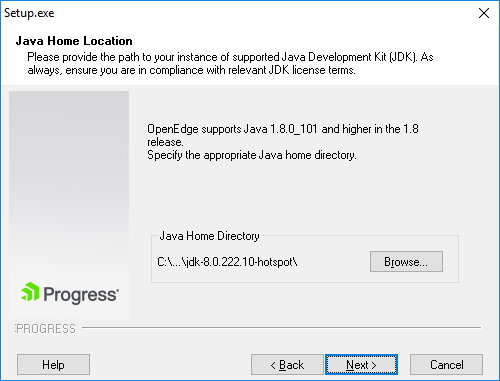 Unix OpenEdge Installer: Java Home Directory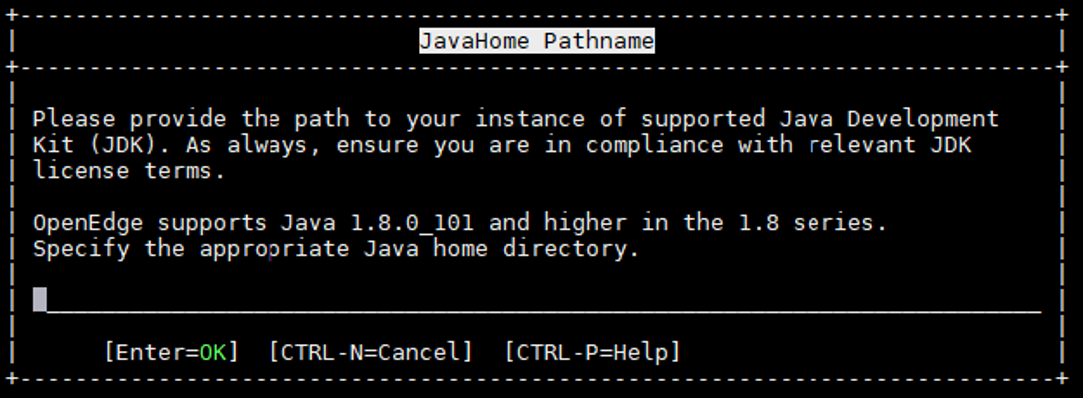
- Do I have to install the JDK or the JRE?
OpenEdge 12.1 requires the Java Development Kit (JDK). The JDK contains the JRE.
- How do I provide JAVA_HOME to a silent (batch-mode) installation?
During the interactive installation, the JAVA_HOME used will be saved in the response file:
<DLC>\install\response.ini:
;
; DESCRIPTION of Select JavaHome Dialog
;
;  JAVA_HOME - select the java home directory.
;  Result - is used as the return code for this section. Only a value of 1 is acceptable.
;
[Select JavaHome Dialog]
JavaHome=C:\Program Files\AdoptOpenJDK\jdk-8.0.222.10-hotspot\
Result=1
The JavaHome can be modified to point to the deployed environment's Java installation before running the Silent Installer with the response.ini.
<path-to-install-media>\setup.exe
-pcs_s -notify
-psc_f1=<path>\<response-file-name>
-psc_f2=<path>\<oe12-silent-install-logfilename>
For more details on how to create a response.ini file to perform a silent installation, refer to Articles:
- Where do OpenEdge products look for the current Java settings?
Most components of OpenEdge use the JAVA_HOME property set in <DLC>/properties/java.properties.
Two script files use the JAVA_HOME property from $DLC/properties/java.properties
- $DLC/servers/pasoe/bin/javacfg.sh(.bat) - for PASOE
- $DLC/bin/java_env.sh(.bat) - for everything else
OpenEdge does not use the system's environment variable, we are simply using the same name. You must always set the value through the installation prompt or modify later in the java.properties file.
Other Locations for the current Java OpenEdge products will use:
Should the Java version or Java vendor be changed post-install, apart from updating the java.properties
- Some Windows tools, like the Standalone Debugger and proInventory still go to the registry to find out which Java runtime to use:
HKLM\SOFTWARE\PSC\PROGRESS\12.1\JAVA\JREHOME - Progress Developer Studio (PDSOE) uses the JAVA_HOME property set in %DLC%\oeide\eclipse.ini
- For OpenEdge Management (OEM), the following script updates the PASOE instance that hosts OEM with the JDK version:
- $>proant -f $DLC/install/tlr/cleanup/60_fathom_tlr.xml
OpenEdge Documentation: Install OpenEdge 12; Upgrade the JDK After Installation
- What will happen if I do not set JAVA_HOME, or the Java version in $DLC/properties/java.properties is incorrect?
If the value in java.properties is invalid after a manual change (i.e. Fat-Fingered the path while entering, or it points to an unsupported version), errors like the ones below will be shown:
- JAVA_HOME could not be found
- JAVA_HOME environment variable may not be set correctly
- Java not found: <bogus-path>
- With which JDK was OpenEdge 12.1 testing done?
Progress Software used the AdoptOpenJDK for testing Release 12.1.
- Which JVM from AdoptOpenJDK should be used with OpenEdge (Hotspot or OpenJ9)?
Progress Software has exclusively used the Hotspot JVM for testing Release 12.1.
- Common Mistakes:
- Installed a JRE only - The installation must include a JDK
- Not entering the JAVA_HOME correctly
- Don't enter the "/bin" directory
- Don't add "/bin/java" to the end
- Not using the correct bitness/bit version
- Do not use a 32-bit JVM with 64-bit OpenEdge or vice versa
- On Windows, installing on a drive where short file notation is disabled OpenEdge installation to a directory longer than 8 characters on a drive other than C: does not allow any OpenEdge utility to start
Java Updates:
- Can I patch my Java version, and are there any restrictions to what level of patches can I apply?
The Java patch level can be upgraded, however you must stay within the supported Minor version.
For example:
Given a supported Java version of 1.8.0_101, you can install any 1.8.0 Java patch level above and including _101.
Given a supported Java version of 11.0.4, you can install any 11.0.x Java patch level where x is greater than or equal to 4.
Security updates on Oracle Java 8 since JDK 8u211 and later will require contracting with Oracle. For further information refer to Article:
Security fixes and updates for different Java distributions:
14. How to change the JDK distribution or location JDK is installed ?
After you have installed OpenEdge the current configuration needs to be upgraded to reflect the change. These instructions are provided in the following OpenEdge Documentation:


