Binary dump is the fastest way to dump a database. Binary dump files are portable across all platforms, regardless of CPU type.
To perform a binary dump:
1. Start a server on the database to be dumped.
Presumably, since fewer users are on the system, more memory can be allocated to the shared memory pool with the (-B) startup parameter.
Example:
$ proserve sports -B 100000
2) Start multiple binary dump sessions.
Since these operations are I/O intensive, 3 to 4 sessions per CPU is recommended. Further improvement can be obtained by dumping the data to different disks
Example:
$ proutil sports -C dump customer /disk1/temp/data
$ proutil sports -C dump invoice /disk2/temp/data
To perform a binary load:
The binary load is usually the fastest way to load data into the database when the amount of data in the tables is large. When the amount of data in the tables is small (low count of records) the Data Dictionary dump and load may be faster as there is some overhead in parsing the binary header of the binary load file (.bd). When there are only a few records in a table the overhead associated with parsing the header takes longer to load the table data than the Data Dictionary / Data Administration tool
- Start the database multi-user with no integrity (-i). Understanding that should any error occurs while using the -i flag, there is no ability for the database to perform crash recovery to undo the operations, in which case the load needs to be re-base-lined.
- Start multiple load sessions, one session per Storage Area
- When an Enterprise Database License is in use, start a Before-Image Writer (BIW) and 2- 4 Asynchronous Page Writers (APW's).
- The best database block size is 8K, provided records-per-block have been considered.
Several Articles discuss building scripts for the binary load:
When loading to Type I storage areas, binary load tables with the smallest records first and run one binary load per storage area to not cause fragmentation during the load.
This is no longer as important with the advent of Type II Storage Areas in OpenEdge 10 which are the preferred and recommended storage area structure. Refer to Article: Does loading small records first still affect fragmentation in the Type II Storage Area architecture ?
- Use PROUTIL <db> -C TABANALYS to determine the table(s) with the Smallest records.
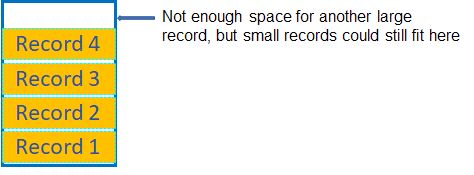
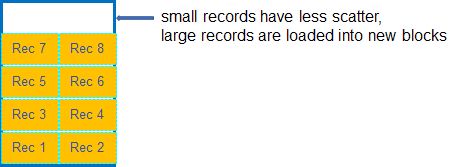
- This strategy reduces scatter because Progress loads as many records as it can into a given block before it moves on to the next when either the records per block or the space in the block are exhausted
- If larger records are loaded first, there are very likely to be blocks with enough record slots remaining and block space to fit smaller records. This leads to fragmentation because the small records are scattered throughout the area.
- If only one table needs to be dumped and loaded, binary load it to a new storage area by also reloading the schema definition for this table and its indexes. Loading the table back into a type I storage area will not improve the scatter factor as records will mainly be loaded into the remaining space they left when deleted.
Example:
4. Fastest way to rebuild the indexes of a Version 8.x or later database:
- Indexes must be rebuilt after binary loading the data.
- In Version 9.1, Progress introduced an option to rebuild the index structure during the binary load phase. An offline idxbuild is still faster particularly since additional parameters were introduced in IDXBUILD Utility for Progress 9.1D07 or higher and OpenEdge 10.2B06 or higher. For further detail refer to Article:


