To disable the collection of statistics for brokers being monitored with Fathom / OpenEdge Management modify the ubroker.properties file for the specific broker to disable the collection of statistics.
This can be done by modifying:
$DLC/properties/ubroker.properties (UNIX)
%DLC%\properties\ubroker.properties (Windows)
Locate the broker name in this file and add the following line to it's properties.
collectStatsData=0
0 means do not collect data for retrieval by Fathom / OpenEdge Management
1 means collect date for Fathom / OpenEdge Management
Example for default WebSpeed broker (wsbroker1):
[UBroker.WS.wsbroker1]
appserviceNameList=wsbroker1
brokerLogFile=@{WorkPath}\wsbroker1.broker.log
controllingNameServer=NS1
description=A sample WebSpeed Transaction Server
environment=wsbroker1
password=
portNumber=3055
srvrLogFile=@{WorkPath}\wsbroker1.server.log
userName=
collectStatsData=0
This property can be dynamically updated. Dynamic changes affect both current and new brokers and/or agents.
For additional information on properties that can be changed for a broker, see the ubroker.properties.README (on Windows) or ubroker.properties.template (UNIX).
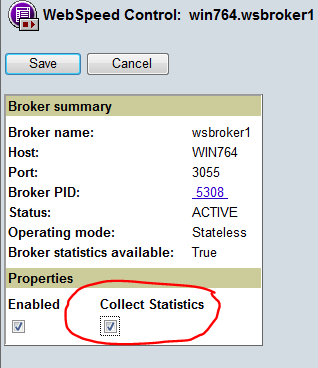
Trending / collection of statistics can also be disabled on a broker level via Fathom or OpenEdge Management (OEM) by:
- Select the specific broker in Fathom / OpenEdge Management.
- Select Broker Control from the Command and control section of the OEM screen.
- Deselect the check box for Collect Statistics. See screen below: