The impact of transactions on other users is essential to the integrity of the database.
TransactionsA transaction is a set of changes to the database which are done completely or not at all. A transaction can be as small as updating or adding a single Order with the Debits and Credits or as large as increasing the Prices of all Items in an Inventory by 10%. What is common between these two examples is that if a transaction is not finished completely there could be a loss of data integrity.
With PROGRESS if an error occurs while processing a transaction, the transaction is backed out. This means that every record that was changed during the transaction is restored to the value it contained before the transaction started.
In PROGRESS a transaction is one iteration of the outermost FOR EACH, REPEAT, or procedure block that contains direct updates to the database.
The following will start a transaction:
- Any block using the TRANSACTION keyword on the block statement (DO, FOR EACH, or REPEAT).
[DO | FOR | REPEAT] TRANSACTION:
    ^
    | < Transaction scope >
    v
END.
- A procedure block and each iteration of a DO ON ERROR, FOR EACH, or REPEAT block that directly updates the database or directly reads records with an EXCLUSIVE-LOCK.
PROCEDURE foo:
    FIND FIRST <record> EXCLUSIVE-LOCK.
END PROCEDURE.
/* foo.p */
FIND FIRST <record> EXCLUSIVE-LOCK.
[DO | FOR | REPEAT] ON ERROR UNDO, LEAVE:
    FIND FIRST <record> EXCLUSIVE-LOCK.
END.
- Directly updating the database means that the block contains at least one statement that can change the database. CREATE, DELETE, and UPDATE are examples. DO blocks do not by default have transaction properties.
/* This record was found with the default SHARE-LOCK
   since no locking instruction was given.

   This is not advisable but is being used to demonstrate
   how a transaction could be started by updating the record. */
FIND FIRST <record>.

DO ON ERROR UNDO, LEAVE:
/* If a transaction is not already started, the following line
   of code will create one and scope it to the enclosing
   block.  In this case the DO ON ERROR block. */
    ASSIGN <record>.<field> = "<somevalue>".
END.
Note: An important thing to remember when determining the size of a transaction is that if a transaction is active when a procedure (a program started with the run statement) is called, the scope of the transaction is defined by the calling program.
FOR EACH <record> NO-LOCK:
    FIND <buffer> EXCLUSIVE-LOCK.
    RUN foo.p.
END.

/* foo.p */
/* Since this procedure was run while a transaction was active, the following statement will return a TRUE value */
MESSAGE TRANSACTION VIEW-AS ALERT-BOX.
Summary: Transactions can start by default or they can be explicitly started using the TRANSACTION keyword on a BLOCK statement.
By using the TRANSACTION keyword it is possible to control the size of a transaction, to make it smaller or larger, in order to meet the demands of the application.
Record ScopeWhen a FIND or a FOR EACH statement reads a record, it places that record in an area of memory called the record buffer. The record is available in the buffer during the scope of the record, which is the duration of that block.
FOR EACH <record>:
    ^
     | < Record Scope >
    v
END.
By default, the scope of a record is the outermost FOR EACH, REPEAT, or procedure block that references the record. Use the COMPILE statement with the LISTING option to see where the record buffers are scoped.
COMPILE <program> LISTING <output-filename>.
The following is output from the LISTING option of the COMPILE statement for a program which accesses the Customer table of the Sports2000 database.
{} Line Blk
-- ---- ---
  1   1  FOR EACH Customer NO-LOCK BY Customer.CreditLimit DESCENDING:
  2   1    DISPLAY "Highest:" Customer.CustNum Customer.Name Customer.CreditLimit
  3   1    WITH 1 DOWN.
  4   1    LEAVE.
  5      END.
  6
  7      FOR EACH Customer NO-LOCK WHERE Customer.State = "NH"
  8        BY Customer.CreditLimit DESCENDING:
  9   1    DISPLAY Customer.CustNum Customer.Name Customer.CreditLimit.
 10      END.
 11

     File Name          Line     Blk. Type      Tran          Blk. Label
-------------------- ---- --------- ---- -------------------------------
.\testscope.p             0     Procedure        No
.\testscope.p             1     For              No
     Buffers: sports2000.Customer
     Frames:  Unnamed

.\testscope.p             7     For              No
     Buffers: sports2000.Customer
     Frames:  Unnamed
In each of the FOR EACH Customer blocks, indicated by the number 1 directly to the left of the code, you can see that the first block scopes access to the Customer buffer to just that block(see below):
  1   1  FOR EACH Customer NO-LOCK BY Customer.CreditLimit DESCENDING:
  2   1    DISPLAY "Highest:" Customer.CustNum Customer.Name Customer.CreditLimit
  3   1    WITH 1 DOWN.
  4   1    LEAVE.
  5      END.
  7      FOR EACH Customer NO-LOCK WHERE Customer.State = "NH"
  8        BY Customer.CreditLimit DESCENDING:
  9   1    DISPLAY Customer.CustNum Customer.Name Customer.CreditLimit.
 10      END.
PROGRESS automatically scopes records to REPEAT, FOR EACH, or procedure blocks.
REPEAT:
    FIND FIRST Customer.
END.

FOR EACH Customer:
    DISPLAY Customer.Name.
END.

FIND FIRST Customer.
The above program generates the below LISTING output. Note that the reference to to the Customer buffer in the REPEAT block is scoped to the REPEAT block. Likewise with the FOR EACH block. All other references to the buffer are scoped to the procedure, which is indicated by NOT placing a 1 before the reference.
...852\expRecScope.p                  03/15/2017 18:21:47   PROGRESS(R) Page 1

{} Line Blk
-- ---- ---
      1   1 REPEAT:
      2   1     FIND FIRST Customer.
      3     END.
      4
      5   1 FOR EACH Customer:
      6   1     DISPLAY Customer.Name.
      7     END.
      8
      9     FIND FIRST Customer.
     10
...852\expRecScope.p                  03/15/2017 18:21:47   PROGRESS(R) Page 2

     File Name       Line Blk. Type   Tran            Blk. Label
-------------------- ---- ----------- ---- --------------------------------
...852\expRecScope.p    0 Procedure   No
    Buffers: sports2000.Customer

...852\expRecScope.p    1 Repeat      No
...852\expRecScope.p    5 For         No
    Frames:  Unnamed
A record can be scoped explicitly to REPEAT, and DO blocks using the FOR keyword.
...852\expRecScope.p                  03/15/2017 18:24:41   PROGRESS(R) Page 1

{} Line Blk
-- ---- ---
      1   1 REPEAT FOR Customer:
      2   1     FIND FIRST Customer.
      3     END.
      4
      5   1 DO FOR Customer:
      6   1     FIND FIRST Customer.
      7     END.
...852\expRecScope.p                  03/15/2017 18:24:41   PROGRESS(R) Page 2

     File Name       Line Blk. Type   Tran            Blk. Label
-------------------- ---- ----------- ---- --------------------------------
...852\expRecScope.p    0 Procedure   No
...852\expRecScope.p    1 Repeat      No
    Buffers: sports2000.Customer

...852\expRecScope.p    5 Do          No
    Buffers: sports2000.Customer
Record scope affects several things, including:
- At the end of a record's scope, if it has been modified it is written out to the database.
- At the end of the record scope, the ABL releases the record and any locks that were placed on it, so long as it is not involved in an active transaction.
- At the end of the record scope validation is performed against unique indexes and mandatory fields.
Record LockingBy default whenever a record is read with a SHARE-LOCK, this means that other users may read the record but may not update it until the SHARE-LOCK is released. If an attempt is made to update a record that is SHARE-LOCKED the program that attempted to update the record will receive a message that the requested record is in use.
To illustrate:
- Connect two clients to the same database
- In session 1 run the following code:
FIND FIRST <record>.
PAUSE.
- After the code in session 1 is executed, run the below code in session 2
FIND FIRST <record> EXCLUSIVE-LOCK.
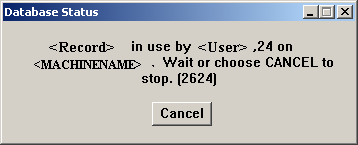
By default when a record is updated PROGRESS puts an EXCLUSIVE-LOCK on the record. Other users cannot read or update the record until the EXCLUSIVE-LOCK is removed. Any attempt to acquire an EXCLUSIVE-LOCK on a record that currently has a SHARE-LOCK or an EXCLUSIVE-LOCK results in a message that the record is in use like the following.
The default record locking strength may be overridden by specifying NO-LOCK or EXCLUSIVE-LOCK when reading the record.
The duration of a lock depends on the type of lock and when it was acquired.
- A SHARE-LOCK acquired during a transaction is held until the end of the transaction or the record release whichever happens later.
Note in the following LISTING file that the Customer buffer was released within the transaction, however its scope continues until the end of the transaction:
...52\lockingScope.p                  03/15/2017 18:32:06   PROGRESS(R) Page 1

{} Line Blk
-- ---- ---
      1   1 DO TRANSACTION:
      2   1     FIND FIRST Customer.
      3   1     RELEASE Customer.
      4   1
      5   1     IF AVAILABLE Customer THEN
      6   1         DISPLAY Customer.CustNum Customer.Name.
      7   1
      8     END.
      9
...52\lockingScope.p                  03/15/2017 18:32:06   PROGRESS(R) Page 2

     File Name       Line Blk. Type   Tran            Blk. Label
-------------------- ---- ----------- ---- --------------------------------
...52\lockingScope.p    0 Procedure   No
    Buffers: sports2000.Customer
    Frames:  Unnamed

...52\lockingScope.p    1 Do          Yes
- A SHARE-LOCK acquired outside a transaction is held until the record release.
To illustrate:
- Connect two clients to the same database
- In session 1 run the following code:
FIND FIRST Customer.
RELEASE Customer.
PAUSE.
- After the code in session 1 is executed, run the below code in session 2
FIND FIRST Customer EXCLUSIVE-LOCK.
Note that there is no locking contention error in session 2 this time.
- A SHARE-LOCK acquired outside a transaction but which is held when a transaction starts is held until the later of the end of the transaction or the record release.
To illustrate:
- Connect two clients to the same database
- In session 1 run the following code:
FIND FIRST Customer.
DO TRANSACTION:
    PAUSE.
END.

PAUSE.
- When the first PAUSE statement is hit, execute the below code in session 2
FIND FIRST Customer EXCLUSIVE-LOCK.
Note that the 2624 error appears as expected.
- Hit the spacebar in the first session, then run the above code again
Note that the 2624 error appears again. This is because the SHARE-LOCK is still being held until the record is released or goes out of scope.
In the above scenario, an EXCLUSIVE-LOCK is only acquired during a transaction, and is held until the end of the transaction. It is then converted to a SHARE-LOCK if the record scope is larger than the transaction and the record is still active in a buffer.
The EXCLUSIVE-LOCK is downgraded to a SHARE-LOCK even if the record was first read with a NO-LOCK. This is because when the NO-LOCK is upgraded to EXCLUSIVE-LOCK. Note that the record must be reread from the database before the lock is applied.
FIND FIRST Customer NO-LOCK.

DO TRANSACTION:
    FIND CURRENT Customer EXCLUSIVE-LOCK.
END.

IF AVAILABLE Customer THEN
    DISPLAY Customer.CustNum Customer.Name.
To override the SHARE-LOCK on a record, in the case where the transaction has ended but the record scope has not, use the RELEASE statement to release the record from the record buffer. However, if the record is still needed for reference after the transaction has ended it will need to be re-found using NO-LOCK.
FIND FIRST Customer NO-LOCK.

DO TRANSACTION:
    FIND CURRENT Customer EXCLUSIVE-LOCK.
    RELEASE Customer.
END.

FIND FIRST Customer NO-LOCK.
IF AVAILABLE Customer THEN
    DISPLAY Customer.CustNum Customer.Name.
SummaryRecord release occurs at the end of the record scope, or when a RELEASE statement is executed.
NOTE: A record will never be released if the transaction in which it is modified is still active.
PROGRESS uses a Lock Table in shared memory to manage record locks. In early versions of PROGRESS (until version 5) whenever a record is read, an entry is made in the lock table. This includes records read using EXCLUSIVE-LOCK, SHARE-LOCK, and NO-LOCK.
In later releases (Version 6 and higher) no entries are made for records read using NO-LOCK.
The size of the lock table defaults to 8192 entries and can be adjusted by using the -L database startup parameter.


